
The rules around SSL certificate expiry changed on March 15th, and while it might sound like a small technical update, it has big implications for anyone running a website.
Much like domain expirations, SSL expiry is one of those things you don’t think about until it causes a problem. And when it does, the consequences can be immediate: browser warnings, lost trust, and in some cases, lost revenue. The difference now is that SSL certificate expiry is going to happen more often.
What actually changed?
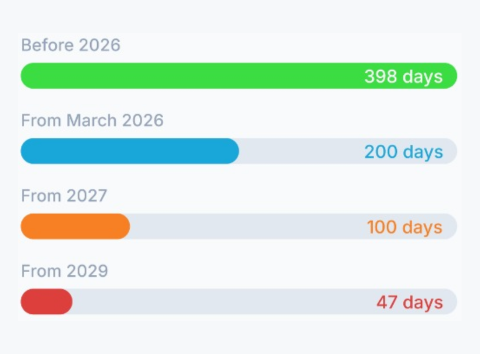
As of March 15th, 2026, all newly issued SSL/TLS certificates are limited to a maximum validity of 200 days. Previously, certificates could last up to 398 days. That meant most businesses only had to think about renewal once annually. Now, that window has been cut in half.
And this isn’t a one-off change. It’s the first step in a phased reduction:
- 200 days from March 2026
- 100 days from March 2027
- 47 days from March 2029
In simple terms, SSL certificates are becoming shorter-lived and much more demanding to manage.
Why is this happening?
There’s a clear reason behind it: security. Shorter certificate lifespans reduce the window of opportunity for attackers. If a certificate or private key is compromised, it can only be exploited for a limited time before it expires.
There are other benefits too: faster adoption of new cryptographic standards, reduced reliance on certificate revocation systems, and a push towards automation and modern infrastructure. The industry is shifting towards a model where certificates are constantly refreshed rather than occasionally replaced.
What happens when SSL certificate expiry hits?
When an SSL certificate expires, browsers don’t quietly ignore it. They actively warn users that your site is “not secure,” and for most visitors, that’s enough to turn them away immediately.
The difference now is frequency. With certificates expiring every 200 days, the chances of something slipping through the cracks increase significantly. Manual processes that worked fine once a year quickly become unreliable when you’re dealing with multiple renewals per year.
The risks aren’t just theoretical:
- Website downtime or blocked access
- Loss of customer trust
- Compliance issues
- Operational disruption
Does this mean you need to buy more certificates?
Not necessarily. SSL products can still be purchased for longer periods such as one or multiple years. However, the certificate itself will need to be reissued and reinstalled more frequently within that term. The cost structure may not change dramatically, but the workload almost certainly will.
The real shift: automating SSL certificate expiry management
This update isn’t just about shorter expiry dates; it’s about forcing a change in how certificates are managed.
Historically, SSL renewal has been a manual task: set a reminder, log into a provider, reissue the certificate, and install it on the server. That approach doesn’t scale when renewals happen every few months—or eventually every few weeks.
Technologies like ACME (Automated Certificate Management Environment) allow certificates to be issued, installed, and renewed automatically without human intervention. For many organizations, adopting this kind of tooling will be the difference between seamless security and repeated disruption.
What should you do next?
If you manage a website or multiple domains, now is the time to review your setup. Start by asking:
- How are your SSL certificates currently renewed?
- Are your processes reliable enough for multiple renewals per year?
- Do you have visibility over all certificates across your infrastructure?
If the answer to any of these is unclear, you’re not alone. Certificate management has historically been fragmented, and this update is exposing those gaps.
Final thoughts
The March 15th update marks a turning point for SSL certificate expiry. What used to be an occasional maintenance task is becoming a continuous process, and the cost of getting it wrong is immediate and visible.
SSL certificate expiry is no longer something you can afford to think about once a year. It’s something you need to build into your systems quietly, automatically, and reliably before it becomes a problem.
Keeping on top of SSL certificate expiry is exactly what Sentinel was built for. Get automatic alerts before your certificates expire, full visibility across all your domains, and the peace of mind that nothing slips through the cracks. Learn more at senti.solutions.